
Key Takeaways
- Cursor AI emerged as top-rated free coding assistant in 2026 with 2,000 monthly completions on free tier and superior context awareness beating GitHub Copilot — Indian developers report 40-60% faster feature implementation using Cursor’s codebase understanding and multi-file editing capabilities versus Copilot’s single-file suggestions, though Copilot remains free for students and open-source contributors making it unbeatable for learning scenarios
- GitHub Copilot still dominates with 95 million users globally but lost market share to Cursor and Windsurf as developers demand agentic coding beyond autocomplete — Microsoft’s acquisition of GitHub hasn’t accelerated Copilot’s evolution to agent-level capabilities while Cursor, Windsurf, and Claude Code offer terminal access, codebase search, and autonomous debugging that Indian developers need for complex production systems requiring multi-step reasoning
- Free tier restrictions force strategic tool selection for Indian developers on limited budgets — Cursor limits 2,000 completions monthly (runs out mid-month for full-time devs), GitHub Copilot costs $10/month after student eligibility expires, Codeium offers unlimited free autocomplete but weaker reasoning, forcing Indians to combine tools: Codeium for basic completion, Cursor for complex features, Claude Code for terminal debugging
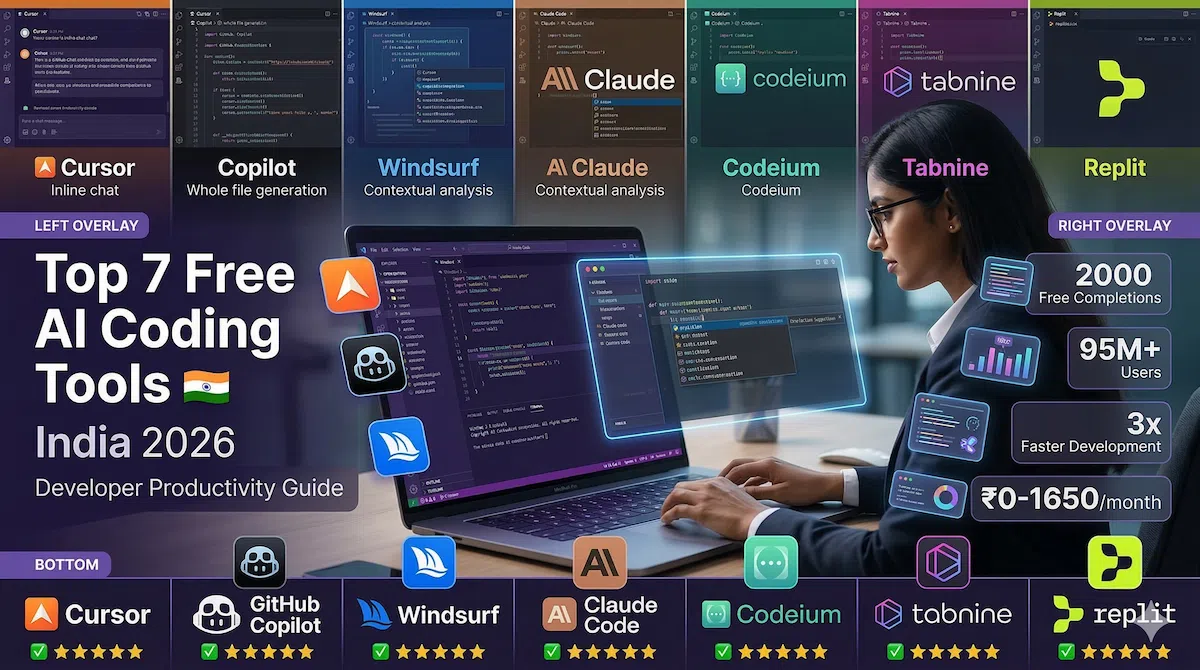
India’s developer ecosystem is witnessing a rapid shift toward AI-powered coding tools in 2026, as platforms like GitHub Copilot, Cursor, and Codeium see rising adoption across startups and IT companies. With increasing demand for faster development and cost efficiency, developers are actively switching to free AI coding tools to boost productivity.
India’s 5.4 million software developers face a productivity paradox in 2026. AI coding assistants promise 2-3x development speed increases and MIT named generative coding tools a “Breakthrough Technology” for 2026, yet most Indian developers haven’t adopted these tools systematically. The barriers aren’t capability or interest—they’re cost, internet reliability, and information overload about which tools actually work.
Free tier limits complicate adoption. A full-time developer writing code 6-8 hours daily can exhaust Cursor’s 2,000 monthly completions in 15-18 days. GitHub Copilot’s $10 monthly fee seems reasonable to US developers but represents 8-12 hours of billable work for Indian freelancers or significant expense for students and junior engineers earning ₹25,000-40,000 monthly. Choosing the wrong tool means wasted learning time and hitting paywalls mid-project.
Based on current developer trends and real-world usage in India, these tools are emerging as the most popular choices in 2026.
The seven tools covered represent different approaches to AI-assisted coding. Cursor and Windsurf reimagine the entire IDE with AI-first architecture. GitHub Copilot and Codeium integrate into existing editors as powerful autocomplete. Claude Code and Aider operate from terminal for command-line workflows. Tabnine prioritizes local execution and privacy. Understanding which approach fits your workflow, budget, and development environment determines whether you achieve 3x productivity gains or waste time fighting tool limitations.
Cursor: The New Developer Favorite
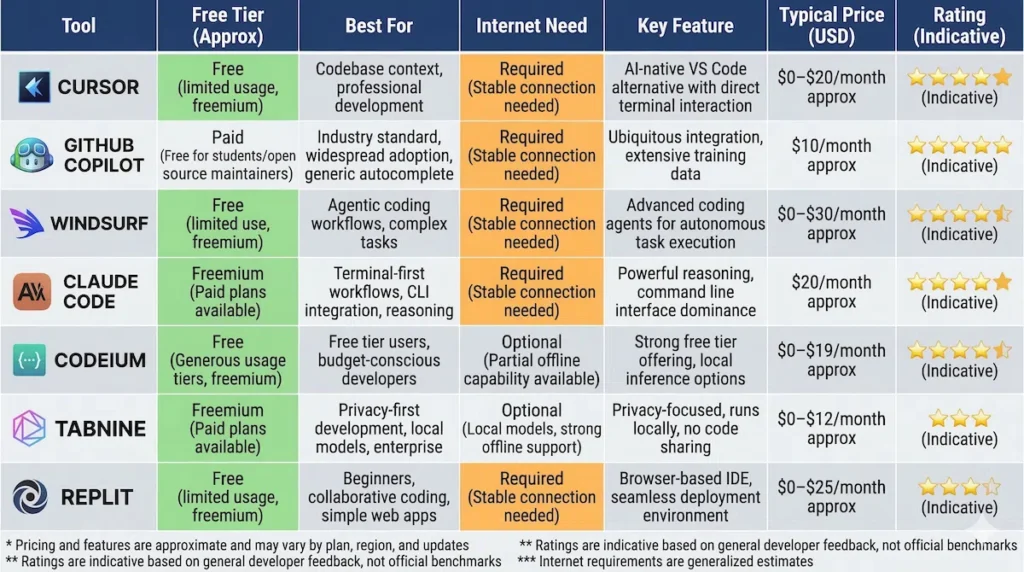
What It Does: Cursor is a full IDE fork of VS Code with AI baked into every interaction. Unlike plugins that add AI to existing editors, Cursor rebuilt the entire editing experience around AI assistance. The AI understands your entire codebase, not just the current file, enabling context-aware suggestions that reference other files, documentation, and project conventions.
Free Tier: 2,000 completions per month, roughly 500-600 AI interactions covering autocomplete, chat queries, and codebase questions. Heavy users exhaust this in 15-20 days, but it’s generous enough for part-time developers or specific project phases.
Best For: Mid-to-senior developers working on complex codebases where understanding context across multiple files matters more than basic autocomplete speed. Cursor excels at refactoring, debugging multi-file issues, and implementing features that touch several parts of the application.
India-Specific Notes:
- Works well on 4G connections—downloads code context locally, so momentary connectivity drops don’t break workflow
- 500MB+ download for initial installation, challenging on slow broadband
- Free tier sufficient for 15-20 focused development days monthly
- Popular in Indian startups (Razorpay, CRED developers report using it)
Pricing: Free tier as described, then $20/month for unlimited (₹1,650/month—expensive for Indian developers)
Why It Tops Developer Rankings: Stack Overflow’s 2026 survey showed 68% of Cursor users rated it “significantly better” than previous tools versus 43% for Copilot. The codebase awareness and multi-file editing make the difference for production development versus learning scenarios.
GitHub Copilot: The Industry Standard
What It Does: Microsoft’s AI pair programmer integrated into VS Code, Visual Studio, Neovim, and JetBrains IDEs. Copilot autocompletes code as you type, suggests entire functions, and answers coding questions via chat interface. Powered by OpenAI Codex, it’s trained on billions of lines of public code.
Free Tier: Completely free for verified students and maintainers of popular open-source projects. Everyone else pays $10/month (₹830/month) or $100/year (₹8,300/year). No free tier for general developers as of 2026.
Best For: Students learning to code, open-source contributors, and developers at companies paying for Copilot Business licenses. If you qualify for free student access, this is unbeatable—no usage limits, well-integrated, constantly updated.
India-Specific Notes:
- Student verification requires .edu email or valid student ID (works with Indian universities)
- Requires consistent internet—each completion calls Microsoft’s servers
- Works on 3G but slower response times frustrate workflow
- Popular in Indian service companies (TCS, Infosys provide licenses to developers)
Pricing: $10/month individual, $19/month business (both paid tiers). Free only for students and qualifying open-source maintainers.
Market Position: Still 95+ million users globally, but growth stagnated in 2025-2026 as Cursor and Windsurf captured developers wanting more than autocomplete. Microsoft’s Copilot integration across entire developer stack (Azure, Visual Studio, GitHub) means it’s not disappearing, but it’s no longer the default choice for experienced developers.
Windsurf: The Agentic Challenger
What It Does: Codeium’s answer to Cursor, launched late 2025. Windsurf is a standalone IDE (like Cursor, also VS Code fork) with “Cascade” AI agent that can autonomously edit multiple files, run tests, and debug errors without constant human guidance. The agent mode sets it apart—you describe what you want built, and Cascade attempts multi-step implementation.
Free Tier: Unlimited basic autocomplete (same as Codeium). Agent features (Cascade) limited to 10 uses daily on free tier, resets every 24 hours. This is more restrictive than Cursor’s 2,000 monthly completions but the daily reset means consistent availability.
Best For: Developers wanting agent-level capabilities (autonomous coding) without paying Cursor’s $20/month. The 10 daily agent uses work well if you batch complex tasks—use Cascade for hard problems, regular autocomplete for routine coding.
India-Specific Notes:
- Lighter weight than Cursor (downloads faster on slow internet)
- Daily limit reset at midnight UTC (5:30 AM IST) means planning usage around Indian workday
- Agent features require stable internet for multi-step operations
- Growing community in Indian developer Discord/Slack groups
Pricing: Free tier as described, Pro plan $10/month (₹830/month)—half the price of Cursor unlimited.
The Cascade Differentiator: Agent mode can implement features end-to-end: modify backend API, update frontend components, add tests, update documentation—all from single instruction. When it works (70-80% success on well-defined tasks), it’s transformative. When it fails, debugging the AI’s mistakes costs time.
Claude Code: Terminal-First Development
What It Does: Anthropic’s command-line coding agent integrated into terminals via MCP (Model Context Protocol). Unlike IDE plugins, Claude Code operates from your terminal, reading codebases, executing commands, debugging errors, and implementing features through shell access. It’s agentic like Windsurf but terminal-native.
Free Tier: Depends on Claude API usage—roughly 50-100 significant coding sessions monthly on free tier before hitting rate limits. More generous than Cursor for developers comfortable with terminal workflows.
Best For: Backend developers, DevOps engineers, and anyone spending more time in terminal than IDE. Particularly strong for debugging, log analysis, infrastructure-as-code, and scripting tasks where terminal context matters.
India-Specific Notes:
- Works on any machine with terminal access (great for remote servers)
- Minimal bandwidth usage compared to IDE-based tools
- Requires technical setup (MCP server configuration)
- Perfect for developers on older laptops (no heavy IDE overhead)
Pricing: Tied to Claude API pricing—free tier, then pay-per-use. Approximately $5-15/month for moderate usage (₹415-1,245/month).
Terminal Advantage: If you’re SSH’d into a production server debugging issues, Claude Code accesses the same environment you’re in. IDE-based tools can’t match this—they work on local code, not live servers. For DevOps and infrastructure work, this is game-changing.
Claude Code has also been in the spotlight recently after reports of a major leak surfaced, raising questions about security and rapid adoption of AI coding agents. Read more about the incident here.
Codeium: Unlimited Free Autocomplete
What It Does: AI autocomplete plugin for 70+ IDEs and editors. Codeium focuses on doing autocomplete exceptionally well rather than trying to be an agent or answer complex questions. It’s the tool you install when you want AI assistance without changing your existing development environment.
Free Tier: Unlimited autocomplete, forever free for individuals. No completion limits, no credit card required, no expiration. This is the most generous free tier among all major coding assistants.
Best For: Developers who want autocomplete assistance but don’t need agent capabilities, and anyone on tight budgets who can’t afford paid tools. Works in VS Code, JetBrains, Neovim, Jupyter, and dozens of other editors.
India-Specific Notes:
- Truly unlimited means predictable monthly costs (₹0)
- Works on unreliable internet—caches suggestions locally
- Lightweight plugin doesn’t slow down older laptops
- Popular among Indian freelancers and students (no payment hurdles)
Pricing: Free forever for individuals. Teams/enterprise pricing exists but irrelevant for most Indian developers.
The Unlimited Trade-off: Codeium’s autocomplete is good but not as intelligent as Cursor or Copilot for complex contexts. It suggests based on current file and immediate context, missing the codebase-wide understanding Cursor provides. For 80% of coding (routine functions, standard patterns), it’s sufficient. For the 20% that’s architecturally complex, you’ll want Cursor or Claude Code.
Tabnine: Privacy-First AI Coding
What It Does: AI autocomplete that runs locally on your machine or connects to cloud models—you choose. Tabnine emphasizes data privacy and code security, training models that never send your code to external servers if you use local mode. Popular in enterprises with strict security requirements.
Free Tier: Basic autocomplete with cloud models, unlimited. Local model option requires paid tier.
Best For: Developers at companies with code security policies prohibiting cloud-based AI tools, or anyone concerned about proprietary code exposure. Also good for developers with unreliable internet—local mode works completely offline.
India-Specific Notes:
- Local mode works on flights, trains, areas with no internet (common for Indian developers traveling)
- Free cloud tier requires internet but less bandwidth than Copilot
- Popular in Indian financial services and healthcare (regulated industries)
- Trained on permissive open-source code only (avoids GPL licensing concerns)
Pricing: Free basic tier, Pro $12/month (₹995/month) for local models and advanced features.
The Privacy Argument: If you work at a bank, healthcare company, or anywhere with strict data policies, Copilot and Cursor send code snippets to cloud servers. Tabnine’s local mode keeps everything on-device. For individual developers, this matters less, but for companies, it’s often the deciding factor.
Replit AI: Browser-Based Coding
What It Does: Cloud-based development environment with integrated AI assistant. Unlike tools requiring local IDE setup, Replit runs entirely in browser—no installation, no configuration, just open a browser and start coding with AI help.
Free Tier: Generous free tier with AI autocomplete and chat included. Public projects unlimited, private projects limited to basic tiers.
Best For: Students learning to code, developers on machines where they can’t install software (college computers, office-locked laptops), and quick prototyping when you don’t have your development machine available.
India-Specific Notes:
- Works on Chromebooks and tablets (popular in Indian education)
- No local setup means works even on highly restricted corporate networks
- Requires constant internet (cloud-based entirely)
- Great for Indian students in computer labs (nothing to install)
Pricing: Free tier for individuals, Hacker plan $7/month (₹580/month) for advanced features.
The Browser Advantage: You’re at a friend’s laptop and get an urgent bug report? Open Replit, clone your repo, fix with AI assistance, push the fix—all from browser. For developers constantly switching machines or working from internet cafes, this flexibility matters.
How to Choose: Decision Framework
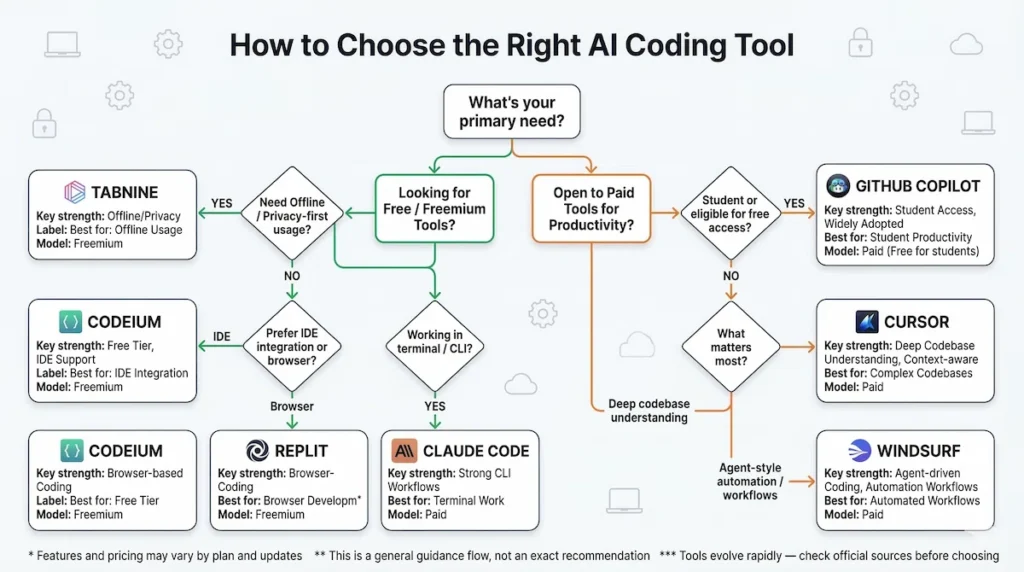
Your ideal tool depends on budget, workflow, and development environment.
Choose Cursor if: You’re a professional developer working on complex codebases, can afford ₹1,650/month or make 2,000 monthly completions last, and want the absolute best AI coding experience available in 2026. Cursor’s codebase understanding justifies the cost for full-time developers.
Choose GitHub Copilot if: You’re a student or maintain popular open-source projects (free tier), or your company pays for licenses. Don’t pay out-of-pocket when better value exists, but if it’s free for you, it’s excellent.
Choose Windsurf if: You want agentic AI capabilities (autonomous coding) cheaper than Cursor. The $10/month (₹830/month) undercuts Cursor while providing similar features. Good middle ground between Cursor’s cost and Codeium’s simplicity.
Choose Claude Code if: You live in the terminal, work on backend/DevOps/infrastructure, or need AI help on remote servers. Terminal-first approach suits workflows where IDE assistance doesn’t reach.
Choose Codeium if: You can’t afford paid tools, want unlimited usage without credit card, or need autocomplete in non-mainstream editors. The free-forever model removes financial barriers completely.
Choose Tabnine if: Your company has strict security policies prohibiting cloud AI tools, you work offline frequently, or proprietary code privacy is non-negotiable. Local mode makes it unique.
Choose Replit AI if: You’re learning to code, can’t install software locally, work from multiple machines constantly, or want zero-setup coding anywhere with browser and internet.
Most Common Indian Developer Setup: Codeium for daily autocomplete (unlimited free), Cursor for complex feature work (stretch 2,000 completions across month), Claude Code for debugging production issues (terminal access). This combination costs ₹0 if disciplined with Cursor usage, or ₹1,650/month for unlimited Cursor if budget permits.
FAQs
Which free AI coding tool works best on slow internet in India?
Codeium and Tabnine work best on unreliable or slow internet connections common in tier-2/3 Indian cities. Codeium caches suggestions locally and requires minimal bandwidth for updates. Tabnine’s local mode (requires Pro plan but runs completely offline after initial download) works even with zero internet. Both handle connection drops gracefully without breaking workflow. Avoid GitHub Copilot and Cursor on slower connections—both require consistent cloud access and lag noticeably on 3G speeds. Claude Code falls in middle—terminal operations need connectivity but use less bandwidth than full IDE sync. Replit requires constant fast internet (cloud-based entirely) making it unsuitable for inconsistent connectivity areas.
Can I use multiple AI coding tools together or do they conflict?
Yes, combining tools is common and recommended for Indian developers managing free tier limits. Popular combinations: Codeium (unlimited autocomplete) handles routine completion, Cursor (2,000 monthly limit) handles complex multi-file features, Claude Code assists terminal debugging. Install Codeium in VS Code, use Cursor as separate IDE for complex work, keep Claude Code in terminal. They don’t conflict because they operate in different contexts. However, running multiple AI autocomplete plugins simultaneously in same editor causes performance issues and conflicting suggestions—disable Codeium when using Cursor’s autocomplete. Strategic tool switching based on task complexity maximizes free tier value: simple functions use Codeium (free unlimited), hard problems use Cursor (limited but better), production debugging uses Claude Code (terminal access needed).
Is GitHub Copilot actually free for students in India or are there hidden costs?
GitHub Copilot is genuinely free for verified students with no hidden costs or credit card required. Indian students qualify through GitHub Student Developer Pack requiring: (1) valid .edu email address from recognized Indian university, or (2) student ID verification via GitHub’s third-party service, or (3) enrollment proof document upload. Verification typically completes within 1-2 days for Indian institutions. Benefits last duration of studies (renewable annually with re-verification) up to maximum graduation date. Free tier includes full Copilot access identical to paid version—no feature restrictions or usage limits while student status remains active. After graduation, Copilot requires $10/month subscription (₹830/month) or $100/year (₹8,300/year). Many Indian developers lose free access upon graduation not realizing student verification expired—GitHub sends reminder emails 30 days before expiration.
Do these AI coding tools work with Indian programming languages or only English-based code?
All seven tools work with Indian regional programming language content within code (Hindi comments, Tamil variable names, Telugu documentation) because they process code structurally rather than requiring English. However, effectiveness varies: Cursor, Copilot, and Windsurf handle multilingual comments well in autocomplete context but may suggest less relevant code if comments are primary context source. Codeium and Tabnine work adequately with non-English comments but suggestions improve with English-language context. Claude Code’s chat interface accepts Hindi/Tamil/Telugu questions about code and responds appropriately, making it most accessible for developers more comfortable explaining problems in regional languages. For teaching programming to students in vernacular medium schools (increasingly common in India), Replit AI’s chat can explain concepts in Hindi when asked, though autocomplete suggestions remain English-syntax code regardless of question language. Best practice: write code and variable names in English for better AI suggestions, use regional languages for comments and documentation where human readability matters.
📌 Disclaimer
Last updated: March 2026
All tool features, performance comparisons, usage limits, pricing, and productivity improvements mentioned in this article are approximate and based on publicly available information, developer feedback, and illustrative scenarios. Actual experience may vary depending on individual workflows, project complexity, internet conditions, and system configurations.
This article is intended for informational and educational purposes only and does not constitute professional or technical advice.
Readers are advised to verify details such as pricing, free tier limits, and features directly from official sources before making decisions.
Product names, logos, and trademarks belong to their respective owners. This article is independent and not affiliated with or endorsed by any company mentioned.